Why Should You Choose 7 Eleven for NBI Clearance Payment?
To make the Clearance certificate process simple and easy, NBI supports various payment options. So that Filipinos can select any option according to their needs and pay the NBI fees or renewal fees. Most Filipinos use local banks or Bayad centers to pay for the fees.
But now another authorized payment option has also been added. This is the 7-Eleven. This payment option is also secure and safe. Filipinos can easily pay the Clearance fees online through 7 Eleven via its Cliqq Kiosk.
Curious to know how this system works or why you should choose 7 Eleven for NBI clearance payment? So, my friend! All details are mentioned in detail for you in this guide.
You must give this complete article a read to understand this payment option and its benefits. So keep reading!
Essential Requirements Before Making Payment
Before moving towards the payment process to book an appointment, you first have to complete a few essential steps. These include that you first fill out the online NBI application form and get your reference number.
This reference number is essential as you have to provide it during the payment process. After you select the payment option, 7-Eleven, you have to provide the reference number for further processing.
How to Make NBI Payments Through 7-Eleven?
Here are quick steps to make your NBI payment through 7-Eleven. You must follow these steps carefully:
Find 7-Eleven Branch
First of all, you should find a 7-Eleven branch that has a functional CLIQQ Kiosk, as there are many branches or stores where the CLIQQ Kiosk is not working. Moreover, for a smooth payment process, you should confirm with the store staff.
Select Payment Option
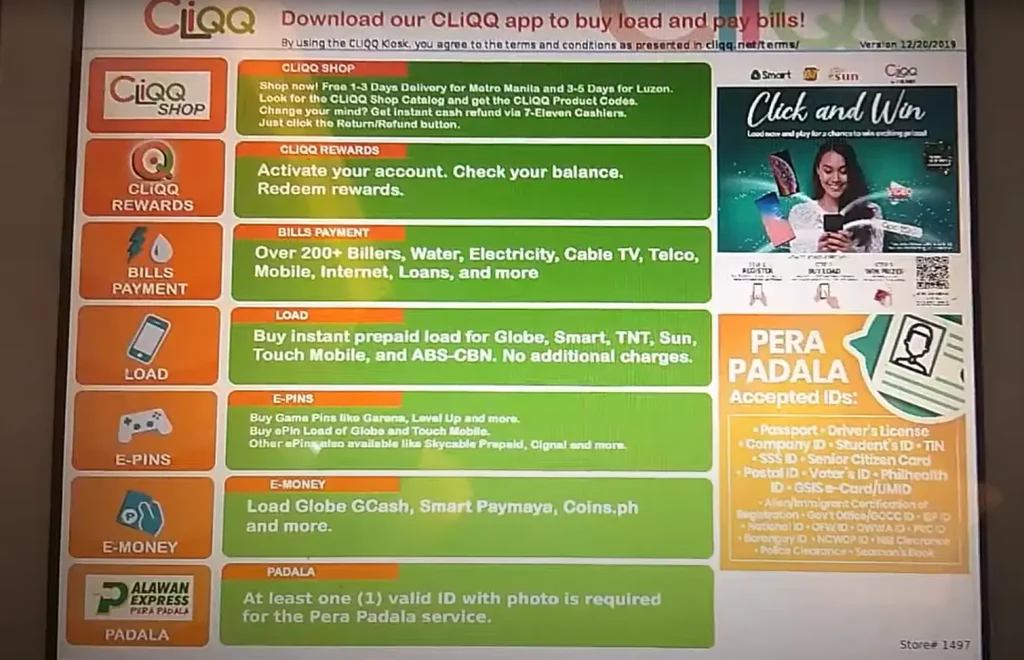
The 7-Eleven CLIQQ Kiosk machine contains a touch screen interface. So, with your fingertips, you can easily navigate all options and make a payment. Here are the steps to select the payment options:
Enter Payment Details
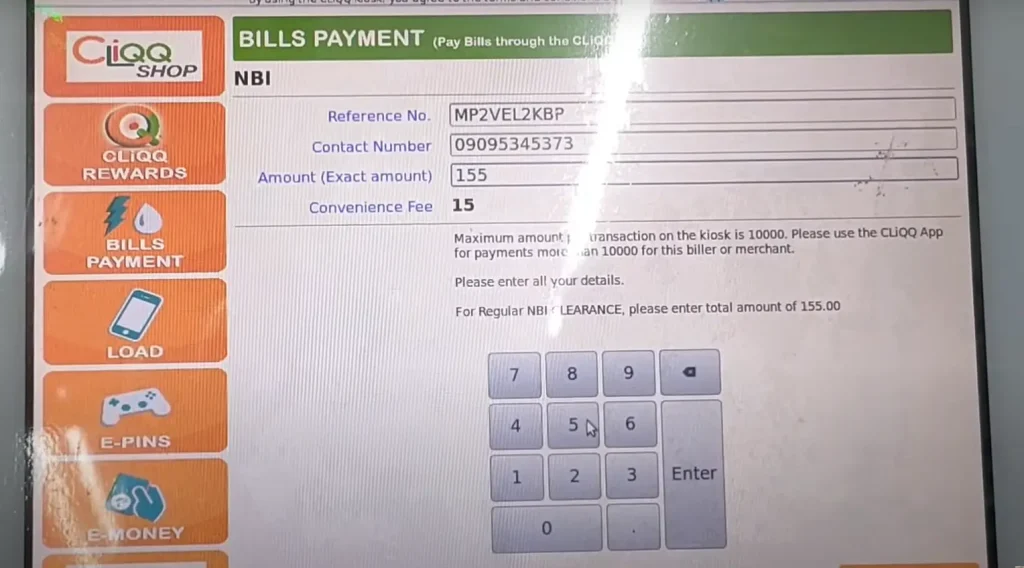
Now, in the form, you should enter your payment details. These details include:
Note! : Before submitting the details or form, you should double-check all your information. You must ensure that your reference number and other personal information are accurate.
Verify Your Information
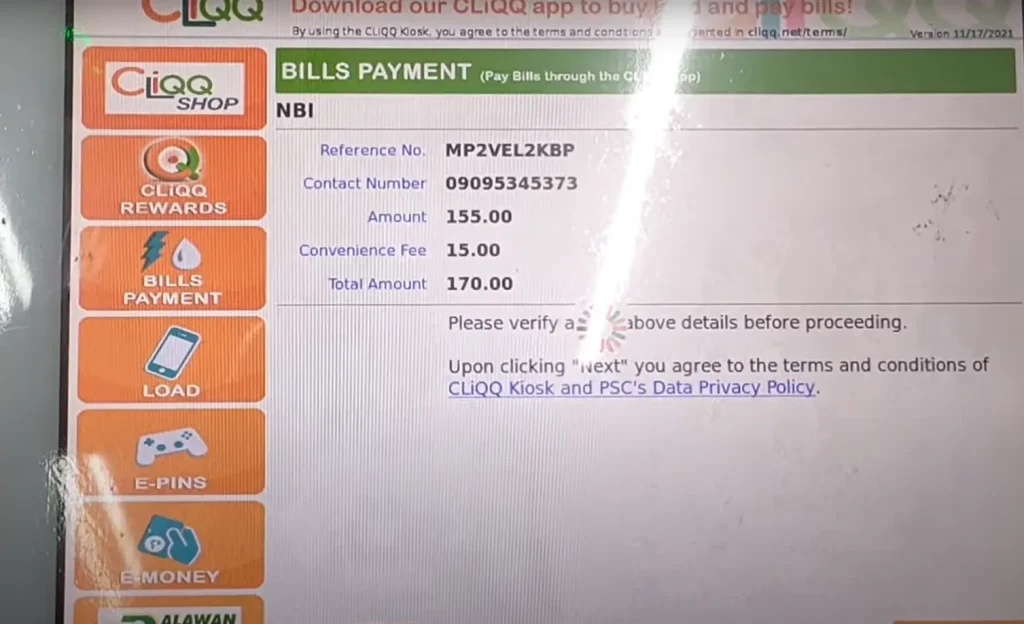
Complete Payment a process
Steps You Should Follow After Making NBI Clearance Payment
After you have completed your payment, you should follow these steps. All these steps are also essential to make your NBI clearance certificate process simple and easy.
Save Payment Receipt
You should save the payment receipt after making a payment. It is because you have to provide payment proof at the NBI branch.
Book Appointment at NBI Branch
After you clear the fees, you should open the NBI portal and book an appointment for biometric verification. You have to upload the payment receipt before booking an appointment.
Visit the Branch for Biometric Verification
Once your appointment is set, you should visit the NBI branch for biometric verification. You will also have to provide the photo and other essential documents.
After the appointment, you must visit the NBI office. However, in case of a missing date, you can visit within a week.
Troubleshooting Issues Related to NBI Payment via 7 Eleven
Sometimes, Filipinos often face issues or other challenges when making payments through the CLIQQ Kiosk. These issues can be due to errors in the machine or a delay in payment updates. A detail of these issues is mentioned below; you must explore them all:
Issues with 7 Eleven System
If you visit any 7 Eleven System and the CLIQQ Kiosk shows that the system is not connected, then you must contact support.
Here are a few solutions that you can apply:
Payment Verification
If you are facing issues with your payment verification or update, then you should follow the given tips:
Why Should You Choose 7 Eleven for NBI Clearance Payment?
There are many benefits of using the 7-11 form for the NBI clearance. Some of these benefits are mentioned below:
Alternative Payment Options to 7 Eleven -H2
If you are unable to use or find the 7-11 system, then you can choose any alternative payment option as well. Some of these options are mentioned below:
Payment Completion Process of 7 Eleven
The final process of NBI clearance fees via 7 Eleven includes various important steps.
Receipt Generation and Payment
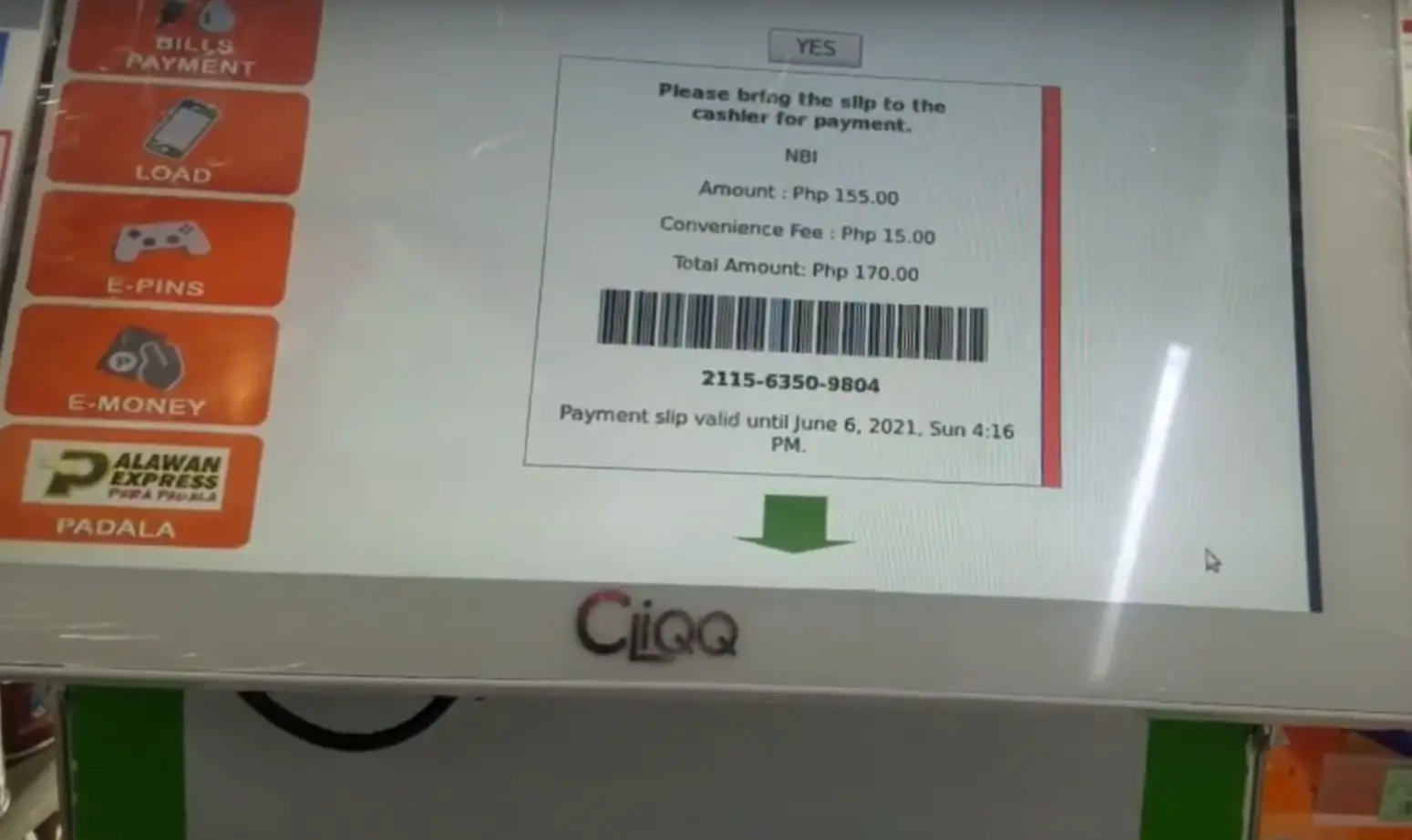
When you have generated your payment slip from the kiosk machine, you should go to the cashier. He will scan a barcode from the slip and provide you with the amount you have to pay.
It is around PHP 170, which includes the PHP 130 basic fees. After you have paid the fees, you should take the receipt and save it.
Essential Security Features
To avoid issues, you should follow some security measures. Like, you can save the receipt in hard and soft copy formats. Do not share your reference number with anyone, and more.
Payment Documentation
You can also save your payment documents in your Cloud storage so that you can access them anytime. It is one of the safest methods to save your documents.
Incorrect information
After filling out the form, you should double-check all your information. It is because incorrect information can lead to payment cancellation or other issues.
Tips for Smooth Payment Process
Here are some tips that you should follow for a smooth payment process:
Contact Customer Support for Any Issues
After trying all methods, if your issues still do not resolve, then you must connect with the support team. They will analyze your issues and guide the best solutions.
Conclusion
However, you will find various methods to pay your NBI clearance fees. Among all these options, 7 Eleven is one of the most used and easiest methods.
You will find various stores at different locations in the Philippines. You can visit any of your nearest branches and make a payment easily. In this guide, all essential details are mentioned for your help. You must read it to make your process easy.

Appreciating the hard work you put into your website and in depth information you offer.
It’s good to come across a blog every once in a while that isn’t the same old rehashed information.
Fantastic read! I’ve bookmarked your site and
I’m including your RSS feeds to my Google account.